Run every job from your truck.
Give every sub and every client their own private link. They see their part of the job on their phone, with no app and no password. Their updates, notes and photos come back to you, in one place, next to your schedule.
Free during the pilot. Nothing to pay today, no credit card. The demo opens a sample builder with 6 jobs, no email needed.


You sit in the middle of every job.
Subs and clients work from their own link. What they send lands in ZAZ, and what you send goes out from there.
The calls, texts and spreadsheets, in one place.
Calling each sub to ask if they're done.
They tap Done on their link and your dashboard shows it.
Answers and photos buried in a group text.
Notes and photos stay on the task they're about, in your inbox.
The client calling to ask how it's going.
They open their link and see progress and the finish date.
Redoing the schedule by hand when one trade slips.
Move one date and see what shifts with it before you save.
Finding out what a sub cost you after the job's done.
Your estimate, what they billed and what's left, as you go.
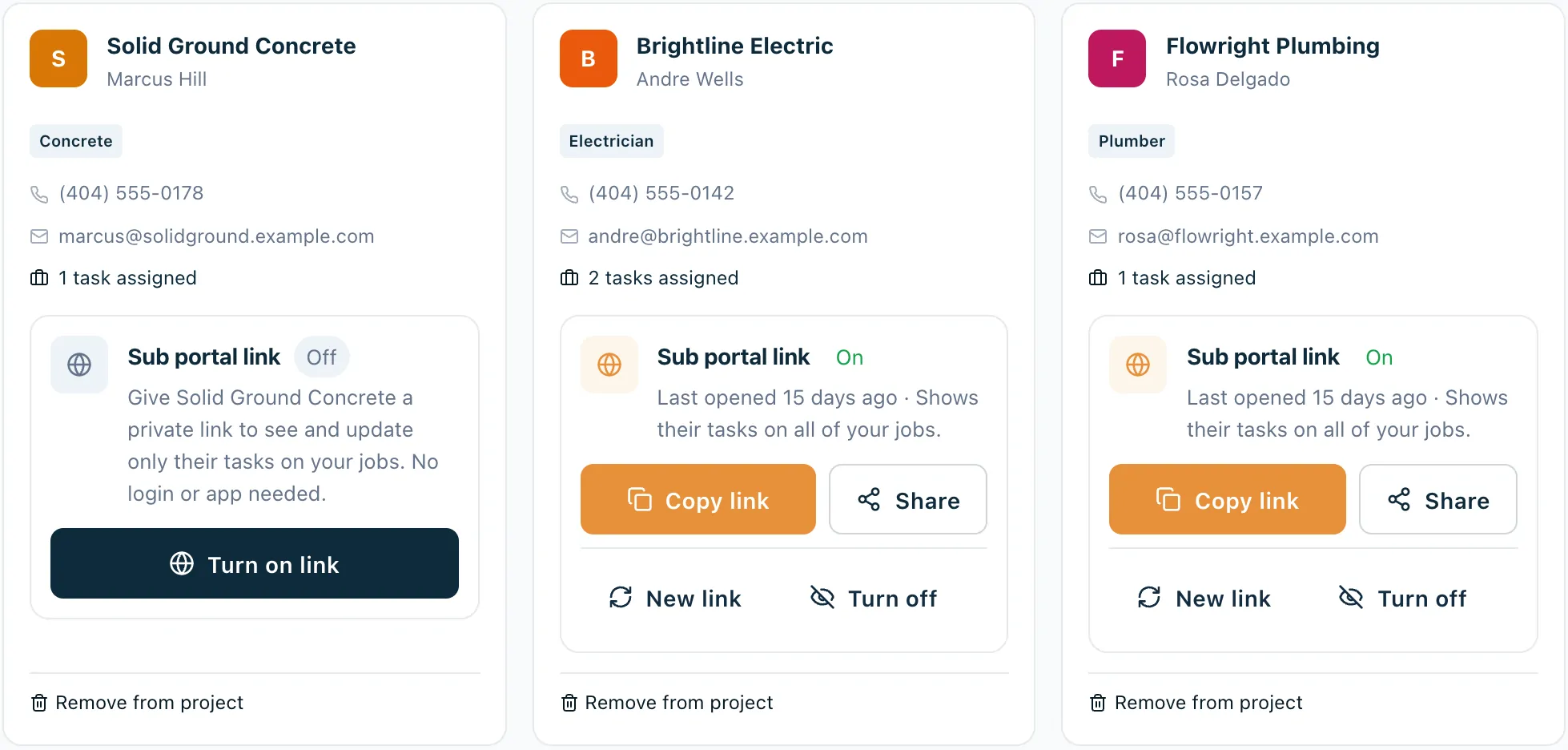
One link for each sub. One link for each client.
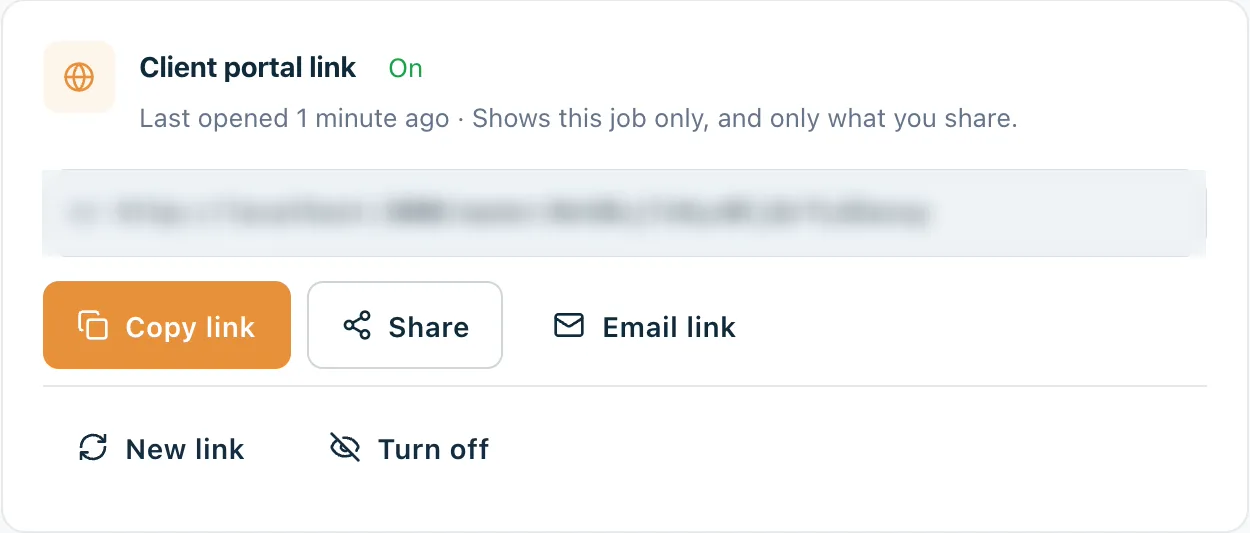
You turn links on from the job, send them however you like, and turn them off whenever you want. Each person sees only their part of the work. Links are unlimited and free for the people you send them to.
Sub link
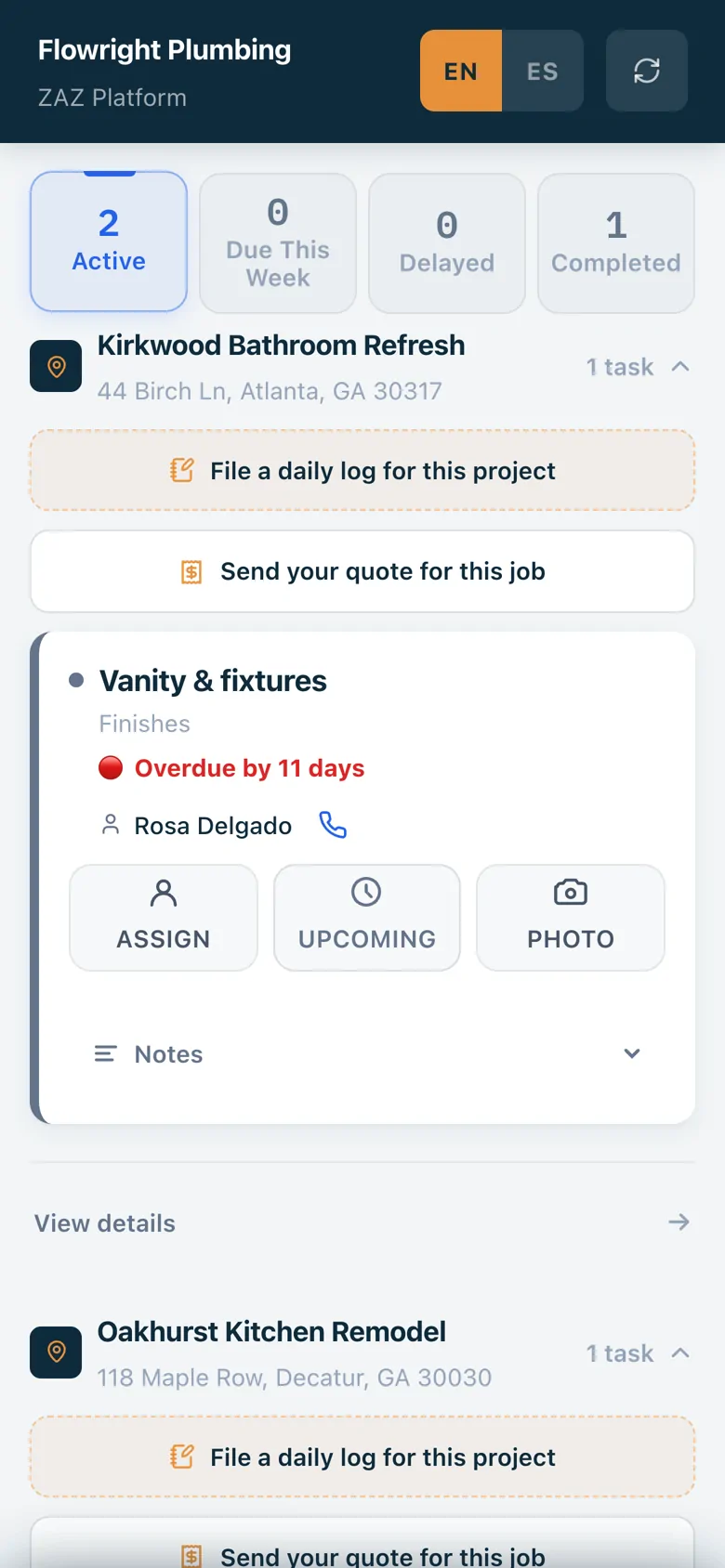
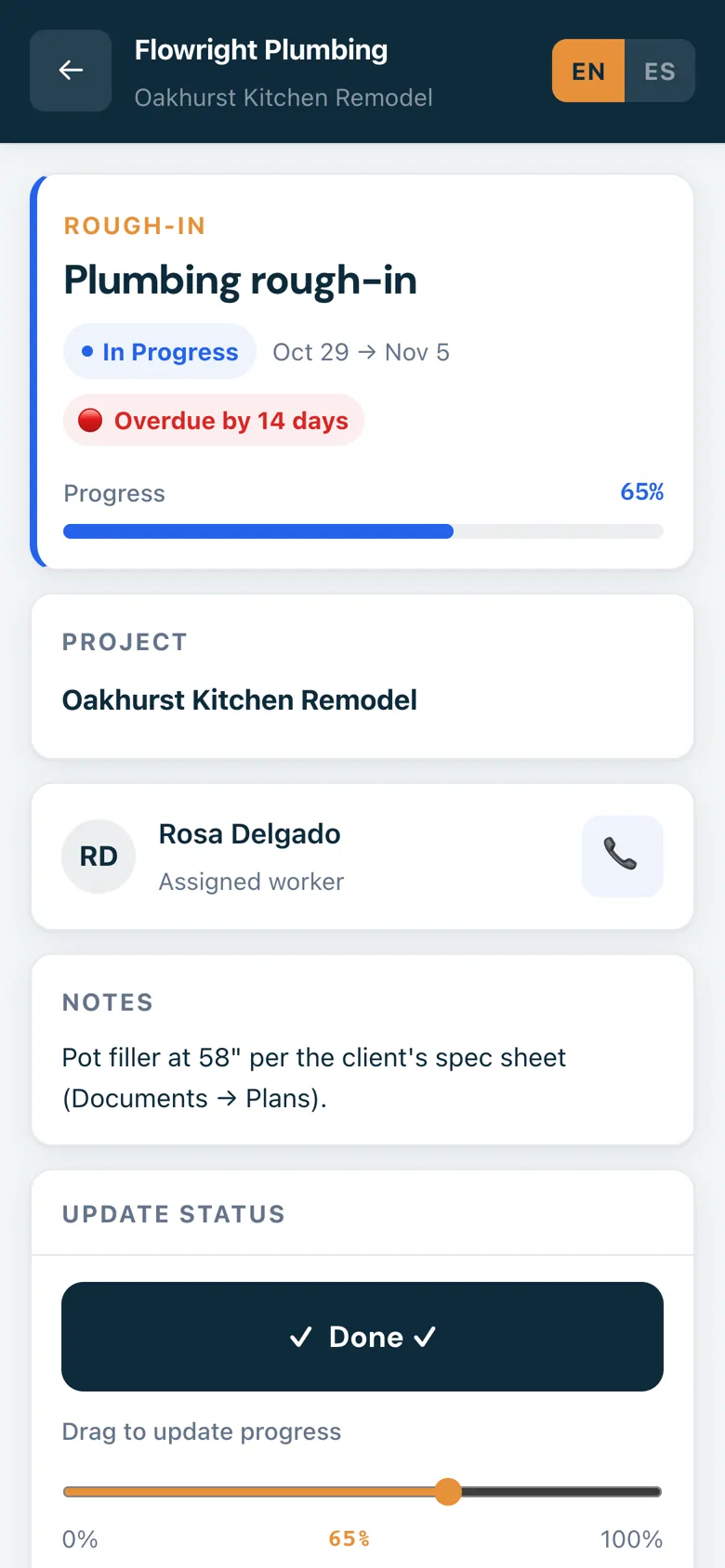
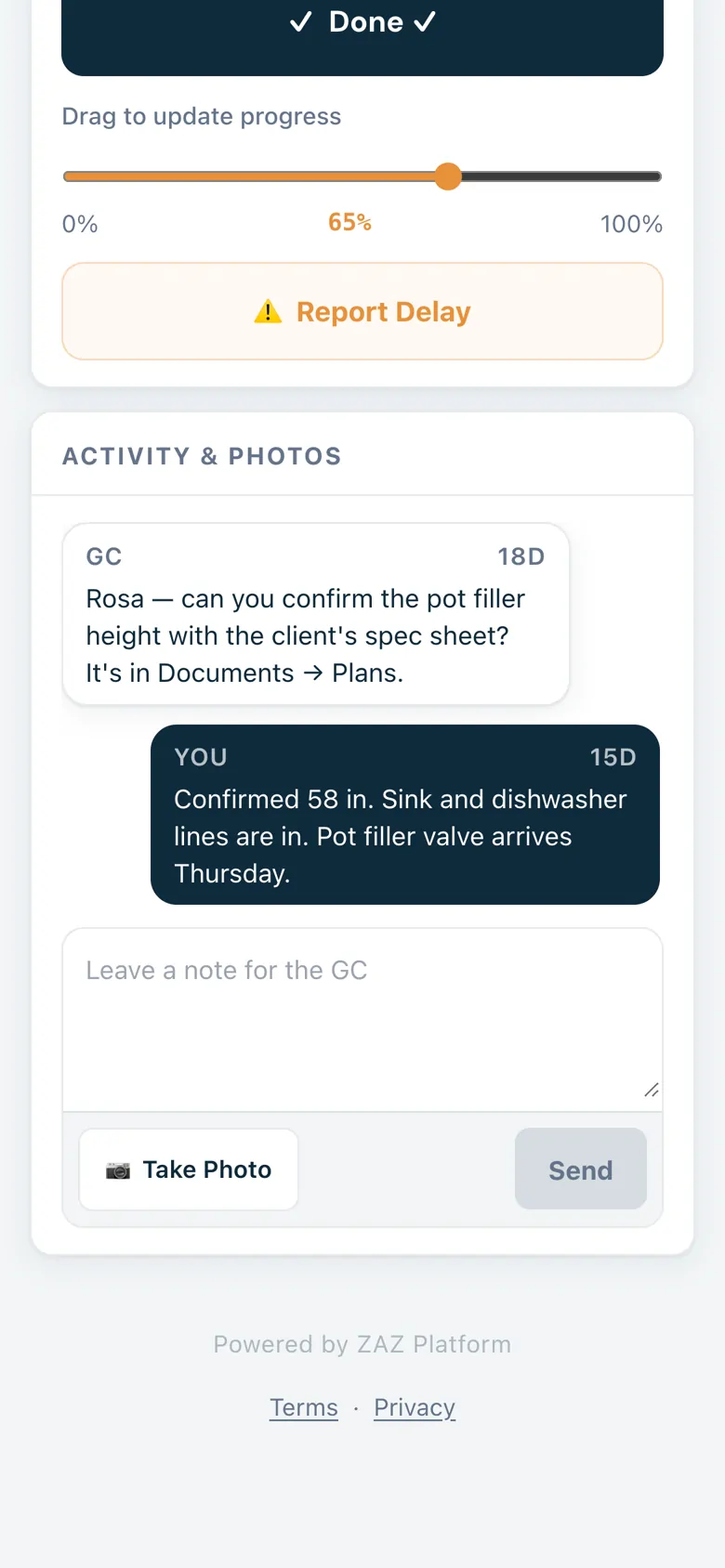
Your subs update the job from their phone.
- Only their tasks. A sub sees their company's tasks on all of your jobs, nothing else.
- Done, progress or delay. Big buttons, plus a reason when they're running late.
- Notes, photos, daily logs and quotes, sent from the job site.
- English or Spanish, one tap at the top.
Client link
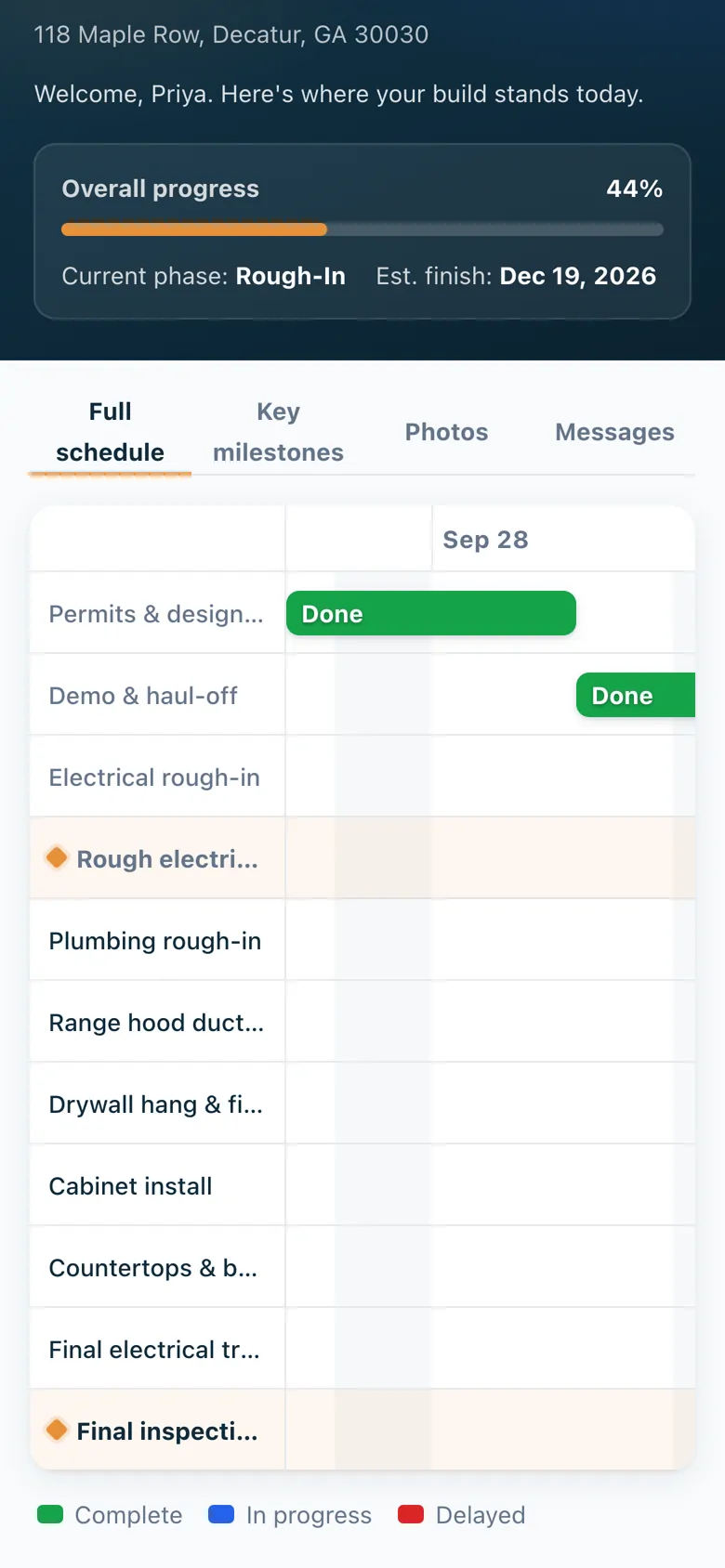
Your client sees how the build is going, and nothing about money.
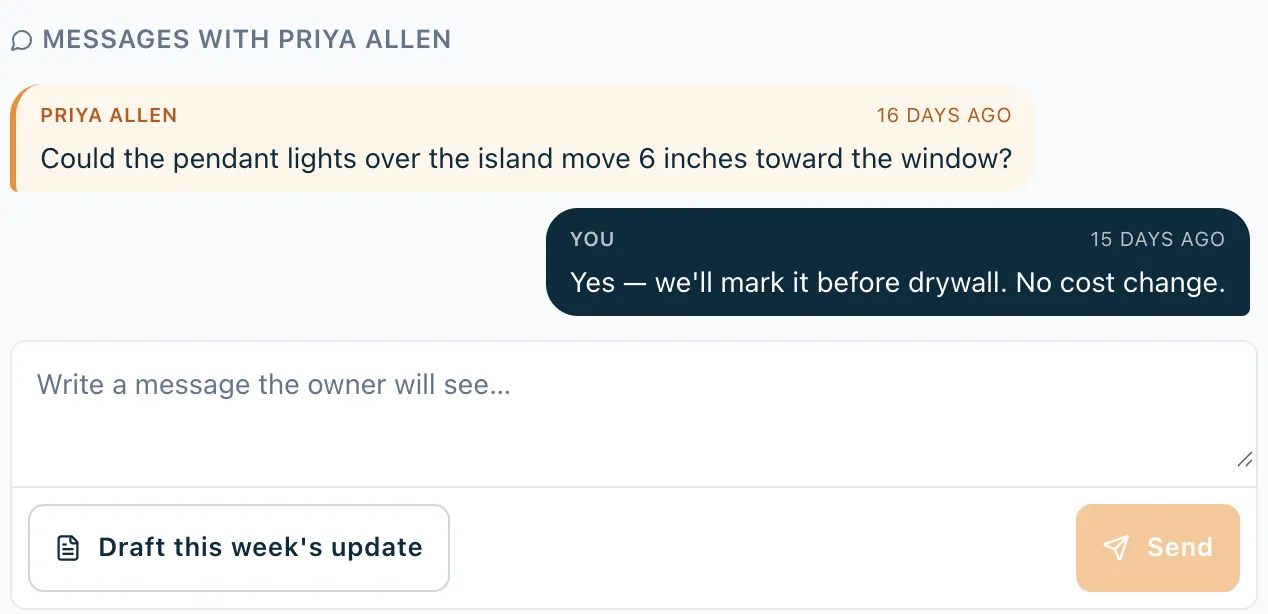
One link per job, with your company name on top. Progress, the current phase and the expected finish, the schedule and key milestones, the photos you share, and a place to message you. That's fewer "how's it going?" calls.
- You pick what shows. Hide any task from the client with one switch. Photos show only when you share them.
- No prices or budgets. The client link never shows money or what you pay your subs.
- A weekly update in one tap. ZAZ drafts it from the schedule. You edit it and press Send.
Every conversation stays on the job it's about.
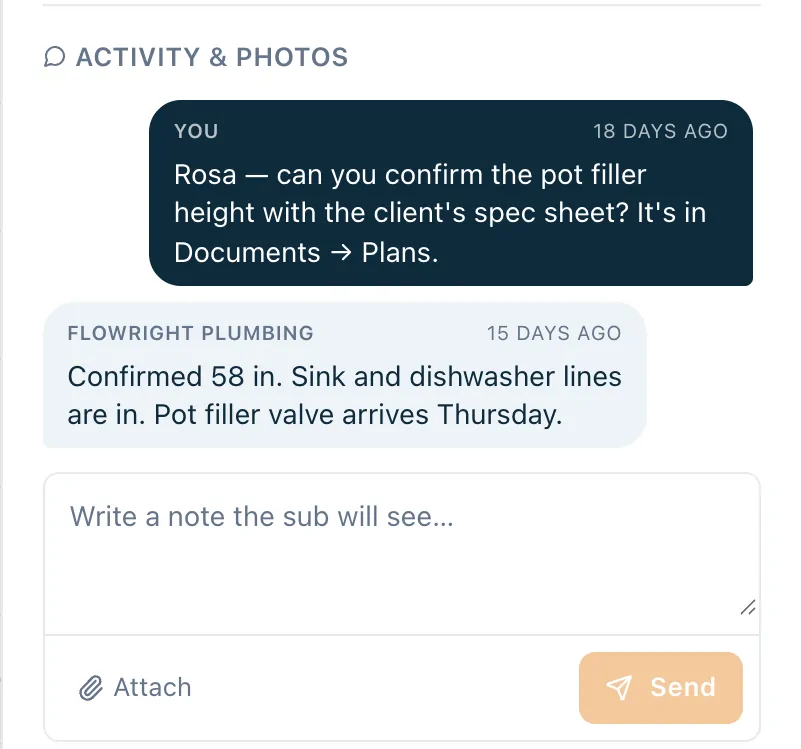
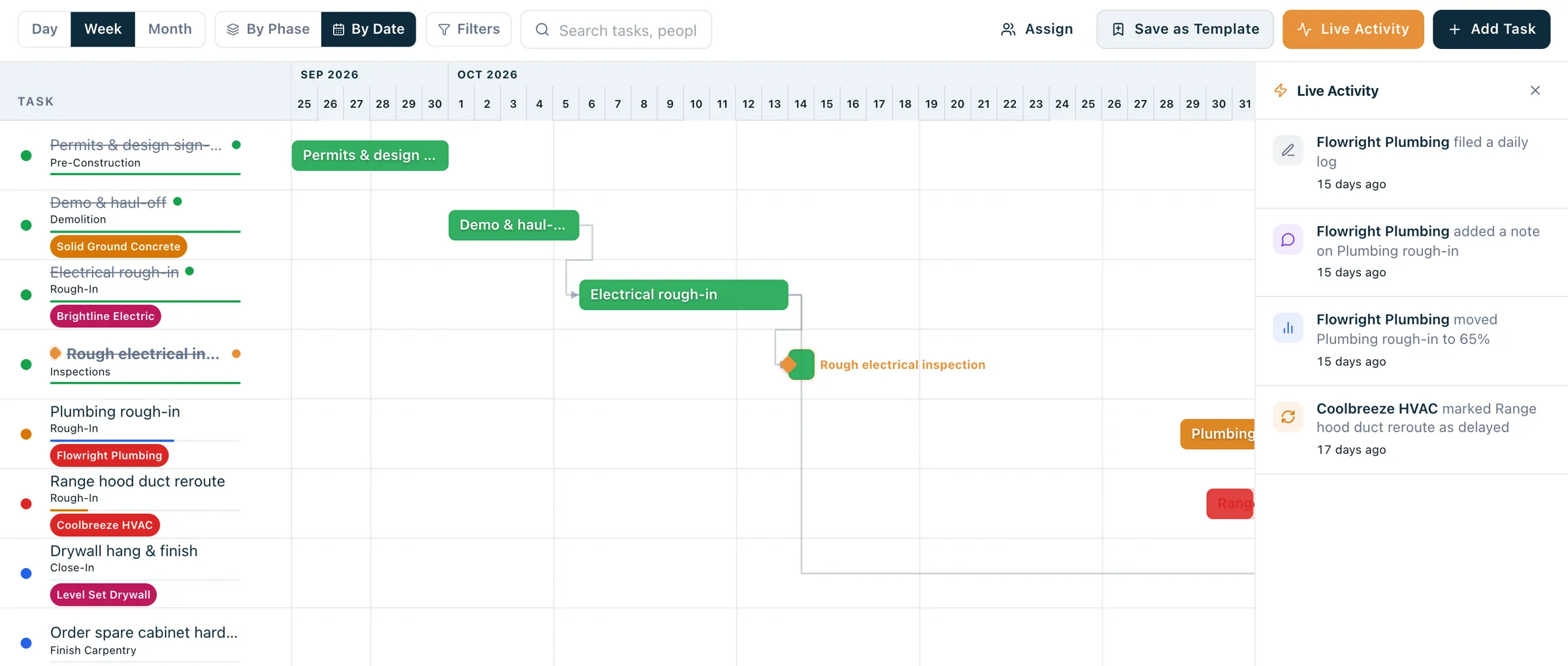
No group texts and no digging through your phone. Notes with a sub live on the task, messages with the client live on the job, and every new one lands in one inbox in ZAZ, like the one at the top of this page.
Meetings on record
Log each meeting with the client on the job, with the date and what you agreed, next to your messages.
Reminders you send yourself
The dashboard lists who's on site tomorrow, with a ready-made reminder and their link. Share it, email it or copy it. ZAZ doesn't send texts.
Nothing to install
Subs and clients open their link in the phone's browser. You use ZAZ on your phone or your computer.
Move one date and the rest of the job follows.
When plumbing slips three days, change it and ZAZ shows which tasks were waiting on it. Nothing moves until you say so. Assign each task to a sub, and it shows up on their link.
- Gantt, list or calendar. Same schedule, whichever view you like at 6 a.m.
- Link tasks that wait on each other. Drywall waits for plumbing, electrical and HVAC.
- Copy a past job or start from a template, then set the first day.
Already have a schedule in Excel or a CSV? Upload it as it is, no template to fill in. If it only lives on paper or in a PDF, email it to sales@zazplatform.com and we'll send it back ready to upload.

Know what every sub is costing you, job by job.
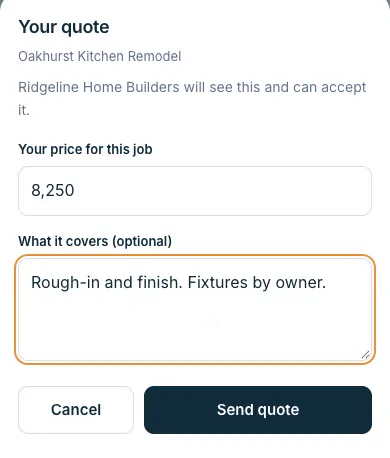
Put in your number for each sub on each job. ZAZ tracks what they've billed, what you've paid and what's left. Subs can send you a quote from their link, and nothing changes until you accept it.
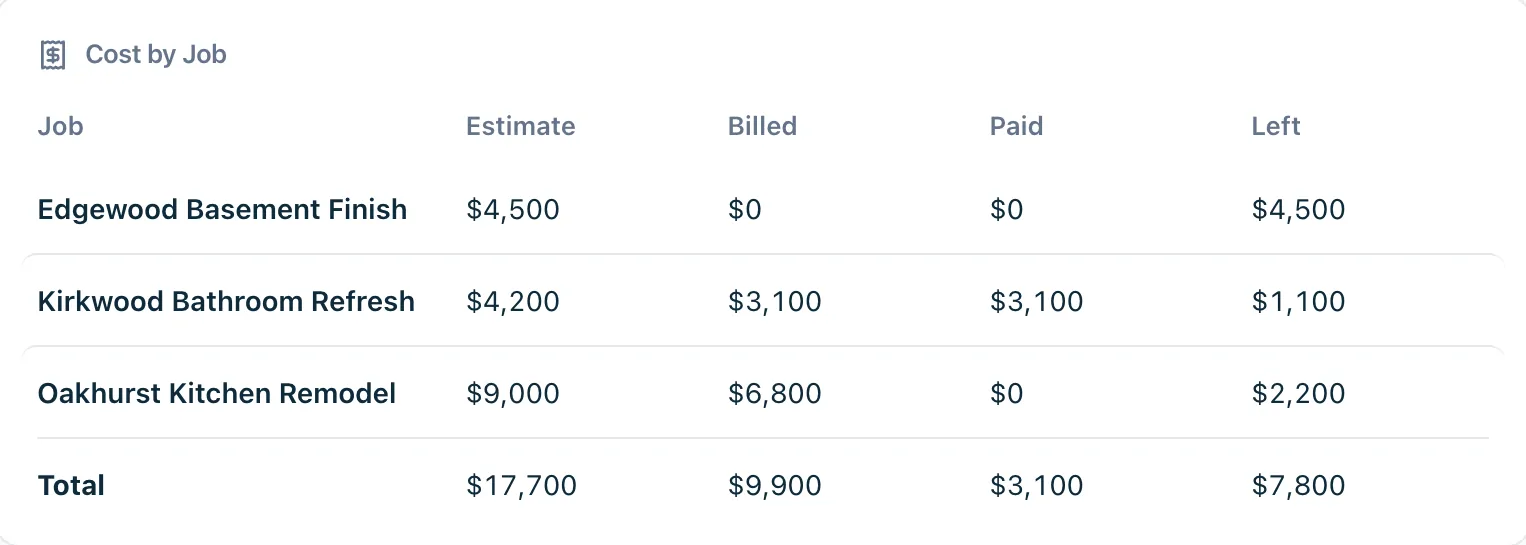
Cost by job
One plumber across three jobs: your estimate, what they billed, what you paid, what's left.
A sub's quote
Sent from the sub's phone. You accept or decline it.
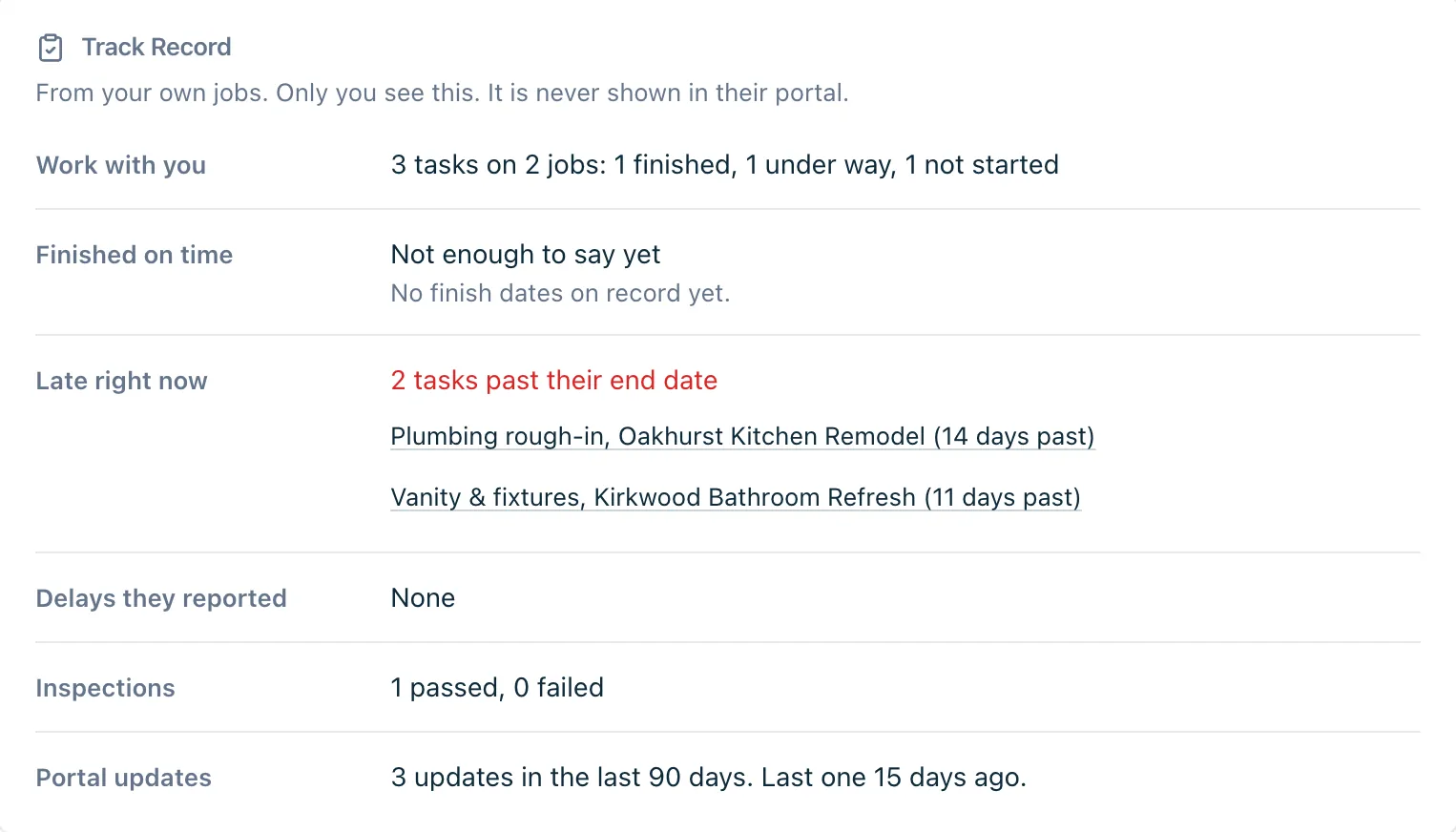
Each sub's track record
How they've done on your own jobs: what's finished, what's late right now, delays they reported, inspections. Only you see it.
Export for QuickBooks. One click gives your bookkeeper a job cost sheet for QuickBooks Online or Desktop. Nothing is sent to QuickBooks, so nothing gets counted twice.
Excel and PDF everywhere. Schedules, payments, people, daily logs and reports all download as Excel or PDF, for the bank, the bookkeeper or your own records.
The rest of the job, in the same place.
Daily logs
Weather, crew on site, work done and photos. Copy yesterday's log to start today's. Sub updates show up here too.
Needs attention
Late tasks and work that's due soon but behind, at the top of your dashboard. Snooze what you've handled.
Inspections
Mark each one pass, contingency or fail, with a note. The sub on that task is told.
Documents
Contracts, permits, plans, invoices and change orders, filed by job and searchable.
Sub track record
How each sub has done on your own jobs: finished on time, late right now, delays reported. Only you see it.
Works on your phone
The whole app works in your phone's browser, with the sections along the bottom of the screen.
From sign-up to your subs' phones in four steps.
-
Create your account
Free during the pilot, no credit card. Your name, company, work email and a password. Then tap the link we email you.
-
Add a job
Job name, address, start date and your client. Pick the subs working on it, or add a new one on the spot.
-
Bring in the schedule
Upload your spreadsheet, start from a template or copy a past job. Paper or PDF? Email it to sales@zazplatform.com.
-
Send the links
Turn on a link for each sub and for the client, then copy it, share it or email it. They open it on their phone.
Free while we're in pilot
No credit card. Every feature on this page is included.
After the pilot, ZAZ is $100 a month. We'll tell you at least 30 days before the pilot ends, and we only charge you if you choose a paid plan.
Get startedWhat you get
- Unlimited projects
- Unlimited sub links
- Unlimited client links
- Task notes and photos with subs
- Client messages on each job
- Gantt, list and calendar
- Upload the schedule you have
- Daily logs with photos
- Inspections and documents
- Cost by sub and sub quotes
- Reports, Excel and PDF
- Export for QuickBooks
- English and Spanish sub links
- 1 user login per account
After the pilot the plan is $100 a month and renews monthly until you cancel. When you cancel, it runs through the month you paid for. Subs and clients never pay and never count as users.
Questions GCs ask us
Something else? Email sales@zazplatform.com.
Do my subs have to download an app or make an account?
No. They open their link in the phone's browser. There's no app, no account and no password. If a link gets passed around, make a new one and the old one stops working.
Do subs or clients pay anything?
No. Links are unlimited and free for them, and they don't count as users on your account.
Does ZAZ text my subs?
No. ZAZ doesn't send text messages. You send links and reminders yourself, from your phone's share button, by email or by copying them. For subs who are on site tomorrow, the dashboard writes the reminder for you.
Some of my crews speak Spanish. Will that work?
Yes. The sub's link switches between English and Spanish with one tap at the top, and remembers their choice.
I already have my schedule in Excel. Do I have to type it again?
No. Upload the Excel or CSV file as it is, in your own layout. ZAZ reads your column headings, in English or Spanish, and shows you the tasks before anything is saved. If it's on paper or in a PDF, email it to sales@zazplatform.com and we'll send it back ready to upload.
Does it connect to QuickBooks?
It doesn't connect to QuickBooks. It exports a job cost sheet your bookkeeper can use with QuickBooks Online or Desktop. Nothing is imported into QuickBooks, so payments that already come in through your bank feed don't get counted twice.
Can my office manager or partner log in too?
Not yet. Each account has one login, for one person. Your subs and clients don't need a login, they use their links.
What can a sub or a client see?
A sub sees only their own company's tasks on your jobs. A client sees how their job is going, the tasks you leave visible and the photos you share. Neither one sees your budgets or your estimates.
What happens to my data if I leave?
It's yours. You can download schedules, payments, daily logs and reports as Excel or PDF any time. After your account ends you have 30 days to export it. We don't sell your data or use it for ads.
Is there a contract?
No. It's month to month and you can cancel anytime. It's free during the pilot, and we'll give you 30 days' notice before the pilot ends. We won't charge you unless you choose a paid plan.
Rather talk to a person?
We're based in Atlanta. Email us to learn more, meet the people building ZAZ, or set up a time to walk through it together.